
trouble shooting for ad creation (October 2023)
Picture this – You’ve spend some time creating a video ad for your small business, in the right format and the right length, and now you’re ready to upload it to ads manager and show the world … but the video won’t load. Why is your perfectly sized, perfectly formatted video being rejected?
The answer is that sometimes it’s a user error (a you problem), sometimes it’s an issue with your broadband (a supplier problem), and sometimes it’s an issue with the Facebook server (a Facebook / meta problem).
Server issues are incredibly frustrating, because they are out of your control. Contacting Facebook support is always going to be a good first step, but if you’ve exhausted the information available on the FAQ pages and Facebook Blueprint, you can be waiting a long time to get the support you need. So what can you do? Read on.
Check list:
Video file size is correct (under 4.0 GB.)
Video length is correct (between 12 seconds and 240 minutes)
Video format is correct ( MP4 or MOV are best)
Internet connection is good (you can use an upload speed checker to test it)
Your web browser is up to date
If you know that your video length and file size and type are all correct, and you know that your internet is running just fine, here’s a few other things to try.
Note : To follow the steps outlined in this post, you’ll need to have your Facebook business page enabled so that you can run ads, to have the correct admin status on the page you wan to run ads from, and to have accepted the terms and conditions for Meta Business Suite and Business Manager.
Take a different route
I’ve found that accessing my Facebook ad creation page through a different route can solve the problem. Firstly, try accessing it on a different device – if you’re using the phone app, switch to a desktop computer and vice versa. This will sometimes solve the problem instantly.
Secondly, try using a different browser (ie, Safari instead of Chrome). It can also help to make sure your browser is up to date, and that you have cleared your cache and cookies. you may even choose to clear your browser extensions to be extra sure it’s not a browser issue.
My browser and internet are working fine, my video is perfect and I’ve tried using another device – now what?
Recently, I had a situation where no videos would upload at all to my Facebook Ads Creation page. I tried using several different videos, going in to Ads Manager on three different devices, on two different browsers, and through two different internet connections but it still just didn’t work! Facebook ads manager allowed me to select a video from my desktop, but the upload “dots” didn’t show any buffering, and the video never appeared in my ad assets.
Thankfully, I had a brainwave and tried entering ads manager through a different route. I had initially gone to my Facebook business page through my personal profile, and accessed Ads Manager / Meta Business Suite through there. But It occurred to me that going in through Meta Business Suite directly might yield results and – finally – I was able to upload my video after two days of trying. I have found before that going in through Meta Business Suite gives a smoother experience generally, so you might choose to bookmark it and always take that route when creating ads.
To go through Meta Business Suite on the desktop, start by closing any existing facebook windows. Then pop over to the Meta Business Suite and Business Manager log in page https://business.facebook.com . If your browser is logged in to Facebook already, it may immediately load your pages and info. Otherwise, you’ll need access to your Facebook profile user name and password to log in.
To go through Meta Business Suite on your mobile phone, you’ll need to download the app from the play store or app store. Then you’ll need to use your Facebook log-ins to access your business page/s.
Just one more thing …
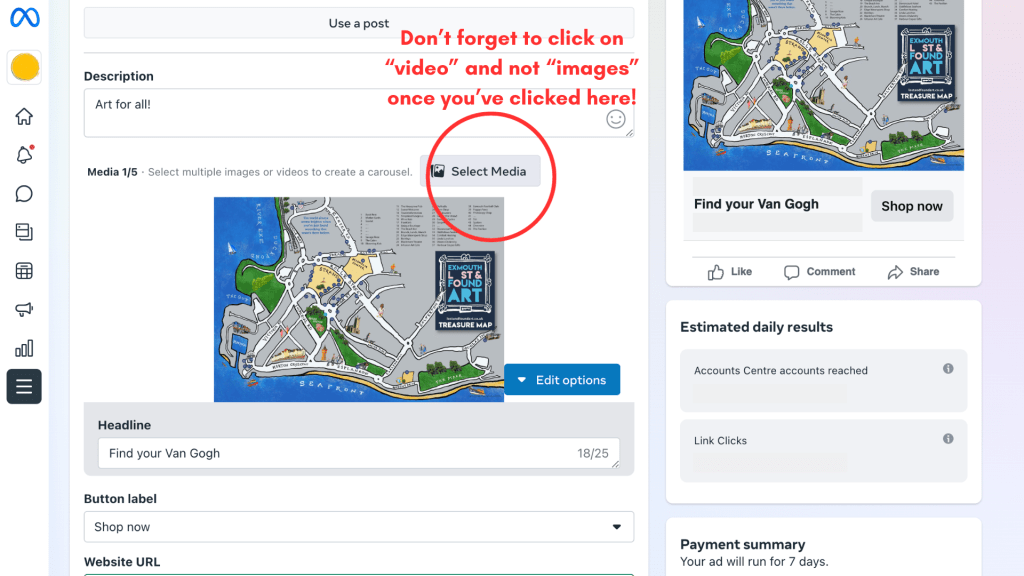
Do make sure that you have selected the video option when you’re trying to upload! It’s an obvious one, but also an annoying thing to miss.
If all that fails, you’ll need to let Facebook Support know that despite checking you internet speed, updating your browser, trying multiple devices and ensuring your video meets all the requirements, it still isn’t uploading. If they give you new solutions then don’t forget to share them with the class!
 Louisa Currier, artist